

How To Install Pgadmin 4 On Ubuntu 18.04
This tutorial shows you how to install pgAdmin 4 on Ubuntu 20.04/18.04/16.04. pgAdmin is an open-source PostgreSQL administration and development tool, pgAdmin is basically used for managing the PostgreSQL database server.
You must have a PostgreSQL server on a Local or remote System/VM. If you don't have then refer to the below document and install PostgreSQL. For this tutorial, I have installed the PostgreSQL server and pgAdmin tool on the same Ubuntu system.
How To Install PostgreSQL 12 on Ubuntu 20.04/18.04/16.04
Step to Install pgAdmin4 on Ubuntu
Step 1: Add PostgreSQL APT repository
wget --quiet -O - https://www.postgresql.org/media/keys/ACCC4CF8.asc | sudo apt-key add - sudo sh -c 'echo "deb https://ftp.postgresql.org/pub/pgadmin/pgadmin4/apt/$(lsb_release -cs) pgadmin4 main" > /etc/apt/sources.list.d/pgadmin4.list && apt update'
Sample Output:
root@PostgreSQL:~# wget --quiet -O - https://www.postgresql.org/media/keys/ACCC4CF8.asc | sudo apt-key add - Warning: apt-key is deprecated. Manage keyring files in trusted.gpg.d instead (see apt-key(8)). OK root@PostgreSQL:~# sudo sh -c 'echo "deb https://ftp.postgresql.org/pub/pgadmin/pgadmin4/apt/$(lsb_release -cs) pgadmin4 main" > /etc/apt/sources.list.d/pgadmin4.list && apt update' Hit:1 http://us.archive.ubuntu.com/ubuntu groovy InRelease Hit:2 http://security.ubuntu.com/ubuntu groovy-security InRelease Hit:3 http://us.archive.ubuntu.com/ubuntu groovy-updates InRelease Hit:4 https://ftp.postgresql.org/pub/pgadmin/pgadmin4/apt/groovy pgadmin4 InRelease Hit:5 http://us.archive.ubuntu.com/ubuntu groovy-backports InRelease Reading package lists... Done Building dependency tree Reading state information... Done 206 packages can be upgraded. Run 'apt list --upgradable' to see them. root@PostgreSQL:~#
Step 2: Install pgAdmin4 on Ubuntu
sudo apt install pgadmin4 Sample Output:
root@PostgreSQL:~# sudo apt install pgadmin4 Reading package lists... Done Building dependency tree Reading state information... Done The following package was automatically installed and is no longer required: virtualbox-guest-utils Use 'sudo apt autoremove' to remove it. The following additional packages will be installed: libapache2-mod-wsgi-py3 pgadmin4-desktop pgadmin4-server pgadmin4-web The following NEW packages will be installed: libapache2-mod-wsgi-py3 pgadmin4 pgadmin4-desktop pgadmin4-server pgadmin4-web 0 upgraded, 5 newly installed, 0 to remove and 206 not upgraded. Need to get 79.7 MB/161 MB of archives. After this operation, 300 kB of additional disk space will be used. Do you want to continue? [Y/n] Y Get:1 https://ftp.postgresql.org/pub/pgadmin/pgadmin4/apt/groovy pgadmin4/main amd64 pgadmin4-desktop amd64 5.2 [79.7 MB] Get:2 https://ftp.postgresql.org/pub/pgadmin/pgadmin4/apt/groovy pgadmin4/main all pgadmin4-web all 5.2 [2,640 B] Get:3 https://ftp.postgresql.org/pub/pgadmin/pgadmin4/apt/groovy pgadmin4/main all pgadmin4 all 5.2 [840 B] Fetched 69.0 MB in 59s (1,178 kB/s) Selecting previously unselected package libapache2-mod-wsgi-py3. (Reading database ... 195104 files and directories currently installed.) Preparing to unpack .../libapache2-mod-wsgi-py3_4.7.1-2_amd64.deb ... Unpacking libapache2-mod-wsgi-py3 (4.7.1-2) ... Selecting previously unselected package pgadmin4-server. Preparing to unpack .../pgadmin4-server_5.2_amd64.deb ... Unpacking pgadmin4-server (5.2) ... Selecting previously unselected package pgadmin4-desktop. Preparing to unpack .../pgadmin4-desktop_5.2_amd64.deb ... Unpacking pgadmin4-desktop (5.2) ... Selecting previously unselected package pgadmin4-web. Preparing to unpack .../pgadmin4-web_5.2_all.deb ... Unpacking pgadmin4-web (5.2) ... Selecting previously unselected package pgadmin4. Preparing to unpack .../archives/pgadmin4_5.2_all.deb ... Unpacking pgadmin4 (5.2) ... Setting up pgadmin4-server (5.2) ... Setting up libapache2-mod-wsgi-py3 (4.7.1-2) ... apache2_invoke: Enable module wsgi Setting up pgadmin4-desktop (5.2) ... Setting up pgadmin4-web (5.2) ... Setting up pgadmin4 (5.2) ... Processing triggers for mime-support (3.64ubuntu1) ... Processing triggers for hicolor-icon-theme (0.17-2) ... Processing triggers for gnome-menus (3.36.0-1ubuntu1) ... Processing triggers for desktop-file-utils (0.24-1ubuntu4) ... root@PostgreSQL:~#
Step 3: Configure pgAdmin4 credentials
sudo /usr/pgadmin4/bin/setup-web.sh Replace Email ID admin@sysadminxpert.local and configure your strong password.
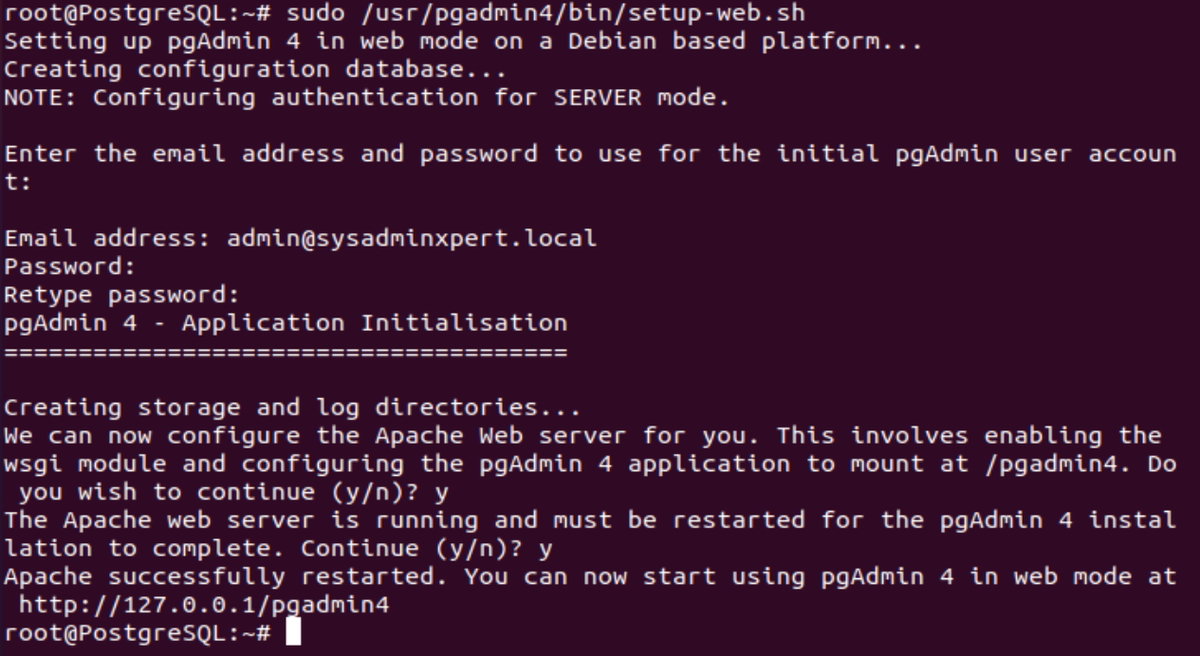
After installation Apache service will be started
$ systemctl status apache2 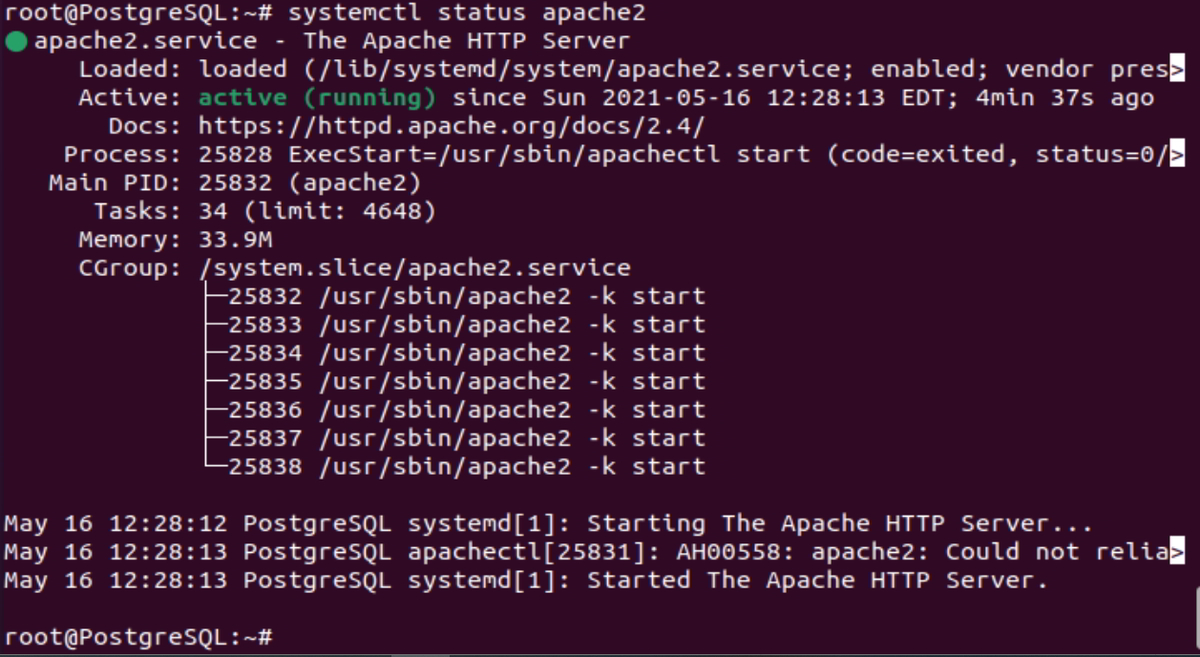
Sample Output:
root@PostgreSQL:~# systemctl status apache2 ● apache2.service - The Apache HTTP Server Loaded: loaded (/lib/systemd/system/apache2.service; enabled; vendor pres> Active: active (running) since Sun 2021-05-16 12:28:13 EDT; 4min 37s ago Docs: https://httpd.apache.org/docs/2.4/ Process: 25828 ExecStart=/usr/sbin/apachectl start (code=exited, status=0/> Main PID: 25832 (apache2) Tasks: 34 (limit: 4648) Memory: 33.9M CGroup: /system.slice/apache2.service ├─25832 /usr/sbin/apache2 -k start ├─25833 /usr/sbin/apache2 -k start ├─25834 /usr/sbin/apache2 -k start ├─25835 /usr/sbin/apache2 -k start ├─25836 /usr/sbin/apache2 -k start ├─25837 /usr/sbin/apache2 -k start └─25838 /usr/sbin/apache2 -k start May 16 12:28:12 PostgreSQL systemd[1]: Starting The Apache HTTP Server... May 16 12:28:13 PostgreSQL apachectl[25831]: AH00558: apache2: Could not relia> May 16 12:28:13 PostgreSQL systemd[1]: Started The Apache HTTP Server. root@PostgreSQL:~#
Step 4: Configure firewall on Ubuntu (Optional)
sudo ufw allow http sudo ufw allow https
Sample Output:
root@PostgreSQL:~# sudo ufw allow http Rules updated Rules updated (v6) root@PostgreSQL:~# sudo ufw allow https Rules updated Rules updated (v6) root@PostgreSQL:~#
Step 5: Access pgadmin4 on web browser
http://[ServerIP_or_domain]/pgadmin4
Login with Credentials which we have created in step 3
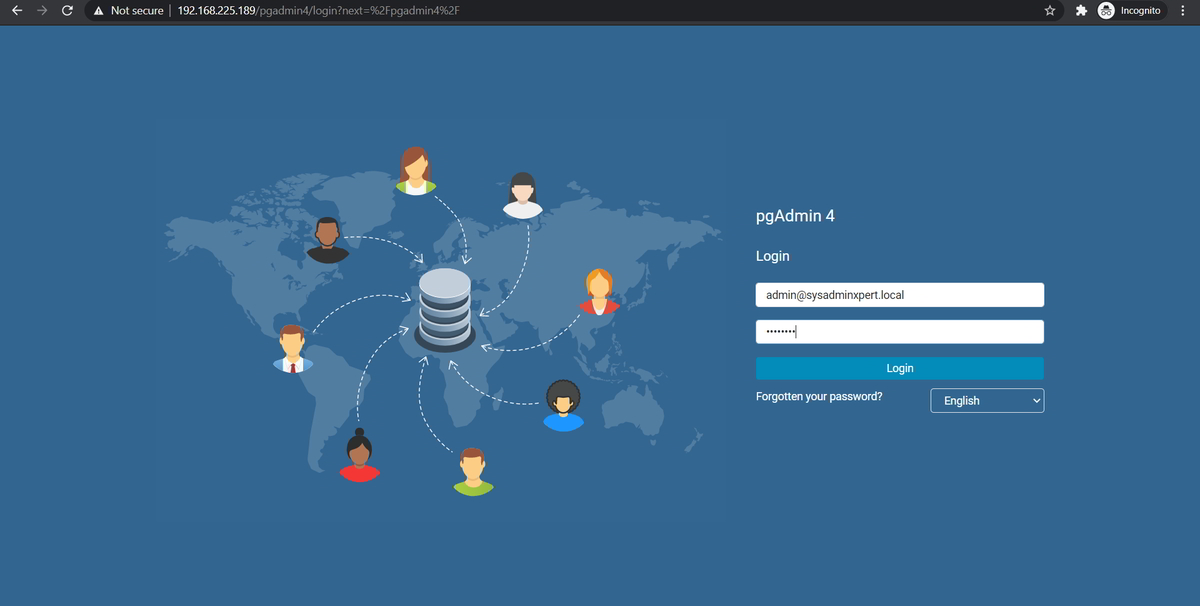
Once you login you will get the below screen.
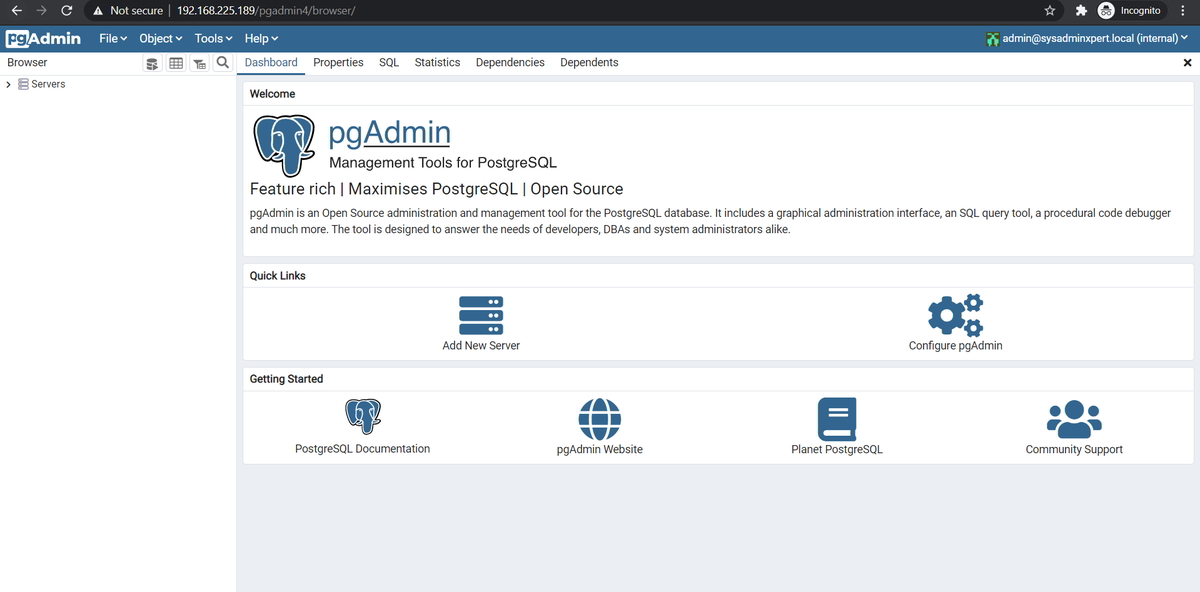
Step 6: Add a PostgreSQL server to administer with pgAdmin
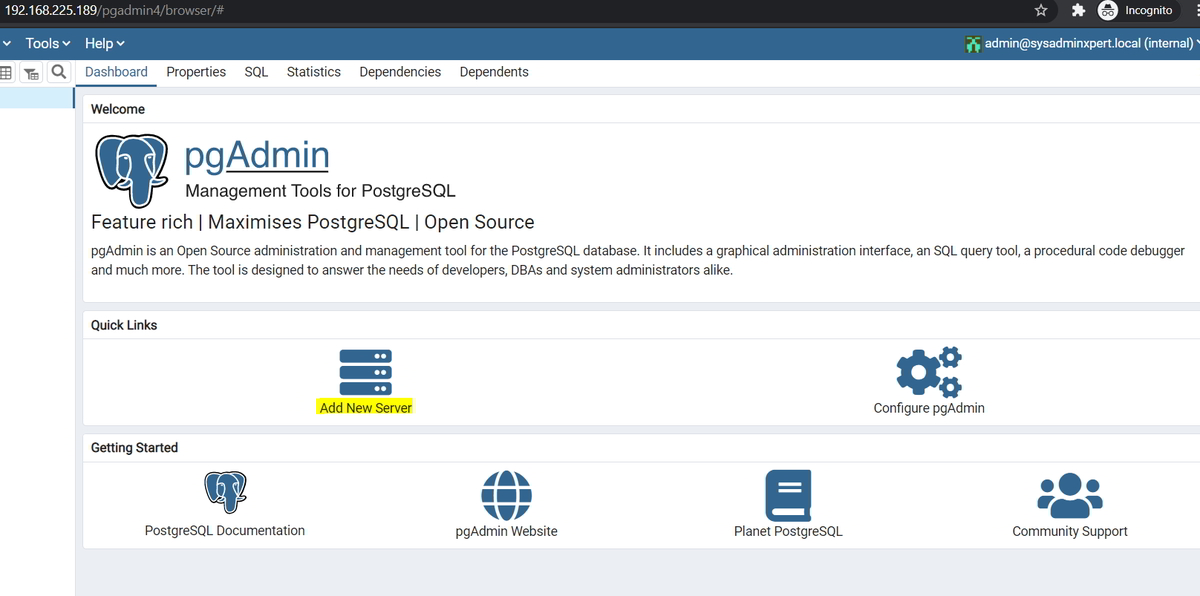
Click on "Add New Server" (you can add local or remote PostgreSQL server)
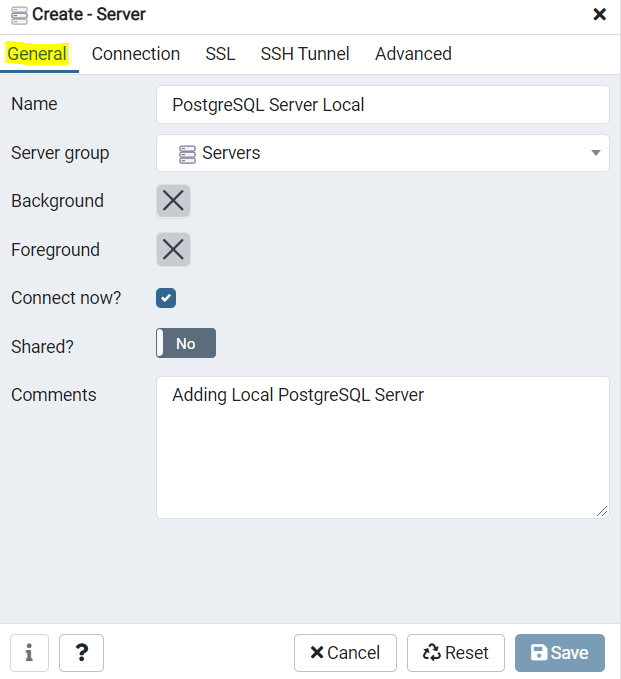
Under the "General" section, Give PostgreSQL server name with description
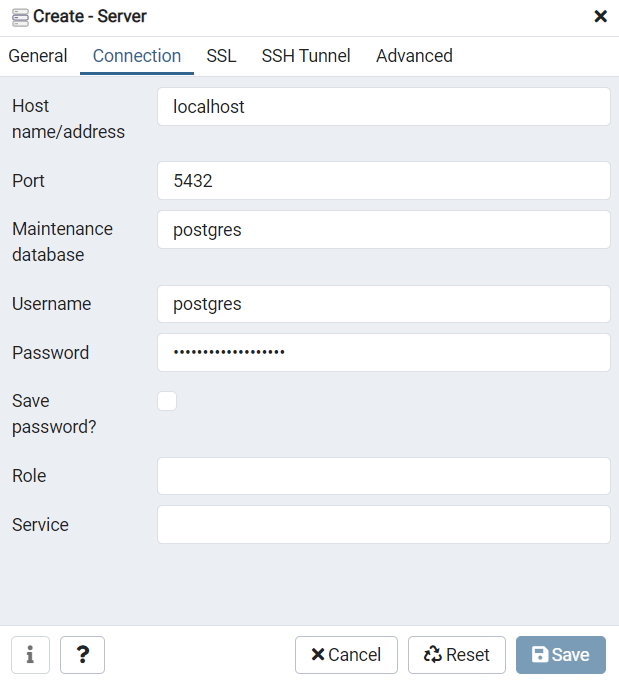
Now, click on the "Connection tab", provide server details like PostgreSQL IP/host, database user, and password
Now save it. If all configuration is correct you will be able to see the PostgreSQL server on the left side.
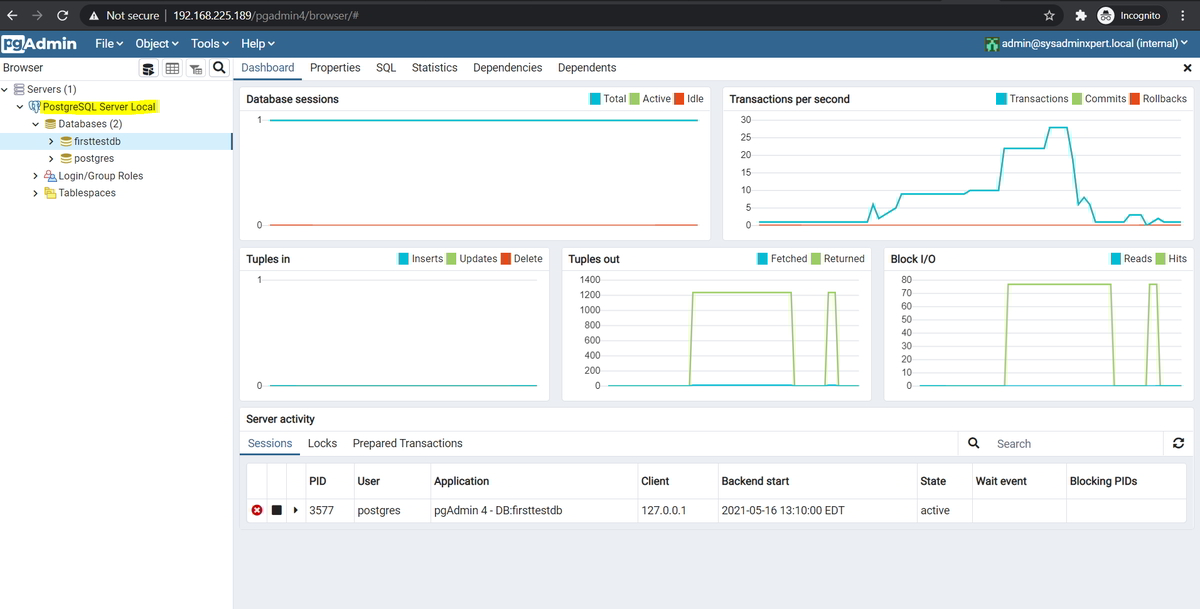
End of the article, we've seen how to install pgAdmin 4 on Ubuntu 20.04/18.04/16.0 and explore more on the pgAdmin web UI.
See also:
How To Install PostgreSQL 12 on Ubuntu 20.04/18.04/16.04
PostgreSQL commands with examples
How to Install PostgreSQL 12 on Fedora 33
How To Install PostgreSQL 12 on CentOS 7 or RHEL 7
PostgreSQL Blogs
List of monitoring tools
Linux Blogs
AWS Cloud Blogs
Database Blogs
DevOps Blogs
Interview Questions & Answers
Docker Blogs
Google Cloud Blogs
How To Install Pgadmin 4 On Ubuntu 18.04
Source: https://sysadminxpert.com/install-pgadmin-4-on-ubuntu/
Posted by: tompkinswhaved.blogspot.com
0 Response to "How To Install Pgadmin 4 On Ubuntu 18.04"
Post a Comment